 Readlet
Give your
eyes a break.
Select text on your screen or open a document. Readlet reads it aloud with natural speech, locally on your Mac.
$19 USD, once · First 10 beta buyers
14-day refund policy. Checkout opening soon.
Apple Silicon · macOS 26+ · English voice
17-second real demo. Play with sound.
Listen to Heart.
The local neural voice used in Readlet.
Made for listening.
Choose your words.
Drag over visible screen text, or open a text document, searchable PDF or image. Escape cancels a selection.
Keep reading local.
After voice setup, text recognition and speech run on your Mac. Your documents stay on your computer.
Set your pace.
Pause, change speed or stop from the small player. Expand it when you need more controls.

The paid beta.
$19USD, once
For the first 10 paid beta buyers.
Before you buy.
Requires Apple Silicon and macOS 26+. First use needs a one-time voice download of about 392 MB. Allow about 1.04 GB free for setup.
Full setup details ↓Includes the current Mac app and written support. No subscription.
- Updates within version 1
- 14-day refund policy. No call required.
- Future major versions are not included
Sales open after download, licensing and installation checks are complete. We aren’t accepting payments yet.
Set up once.
Listen locally.
Install the app, then choose whether to download the local voice package. Setup shows the size and progress, with cancellation and retry controls.
The beta requires an Apple Silicon Mac with macOS 26 or newer. Intel Macs and older macOS versions are not supported.
The current starter is about 1.13 MB. The voice download is about 392 MB and installs about 547 MB. Allow about 1.04 GB free for setup. Final release sizes will be confirmed before sales open.
After setup, speech and text recognition run locally. The download host receives the asset request, not your documents.
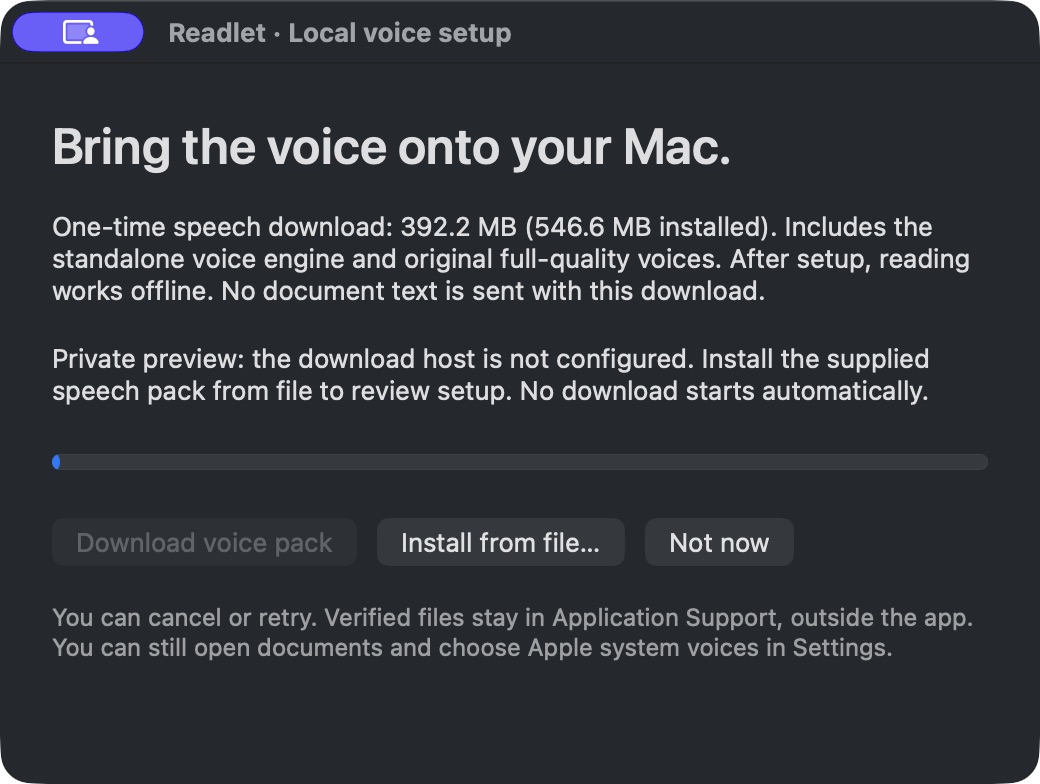
Current setup preview. The live download will be connected before release.
A few good questions.
Which permissions are needed?
Screen Recording lets Readlet capture the region you deliberately choose. It is not continuous recording. Accessibility is optional for selected-text features. Opening documents and explicitly reading the clipboard work without those permissions.
Can it read every PDF?
Searchable local PDFs work best. Complex layouts, columns, tables, protected content, tiny text and low-quality scans may not read correctly. Full multi-page scanned-PDF OCR is not included. A browser PDF may be limited to the visible page.
Will it work offline?
Reading runs locally after the voice package is installed. Internet is required for purchase and first-use voice setup.
Is the selected-text shortcut universal?
Control–Option–R is intended for selected-text reading, but app compatibility still needs broader testing. The point-and-read and local document flows provide other ways to choose content.
How do refunds work?
Request a refund within 14 days of purchase using the support contact on your receipt. The support channel and checkout will be verified before sales open.